Pick a window.
Press Start.
Universal-FrameFX lists your open windows (plus a built-in, jittered test scene), captures the one you choose with Windows.Graphics.Capture, and opens the result either as a click-through overlay exactly on top of that window (you keep typing and clicking in the app) or in a separate full-screen output, with a live HUD showing what the GPU is doing.
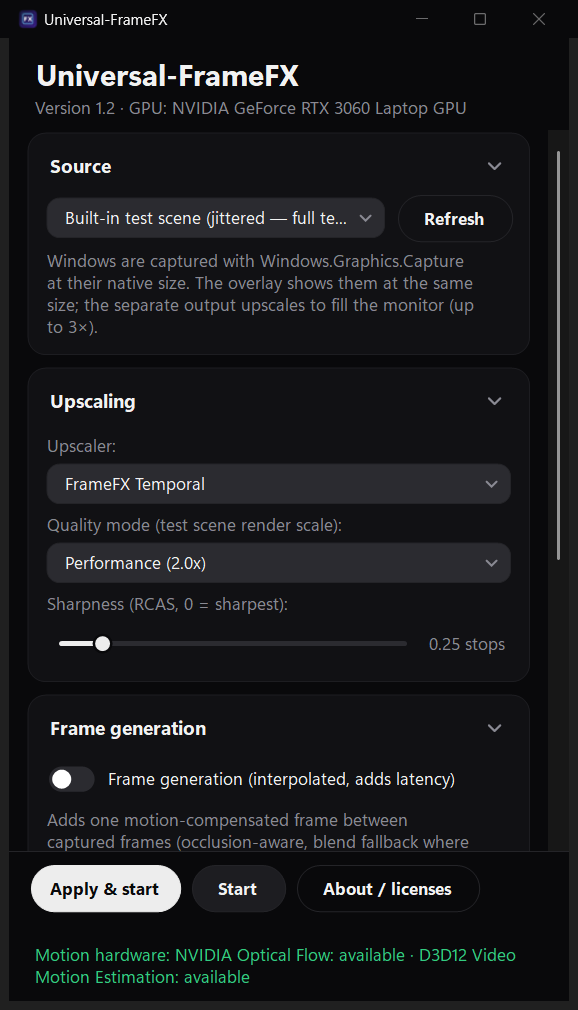
Real screenshot of Universal-FrameFX 1.2 on an RTX 3060 Laptop GPU (Windows 11).
Real motion vectors.
Right on top of the app.
Hardware motion vectors
Motion now comes from the GPU's own motion hardware, in both directions (backward and forward) with a per-pixel confidence map: NVIDIA Optical Flow on RTX cards (runtime included with the NVIDIA driver), D3D12 Video Motion Estimation on AMD and Intel. The 1.1 estimator is the automatic fallback. The app and the HUD show which source is active, and you can pick one yourself.
Crisp text, stable motion
Every 16×16 tile is checked for change. Tiles that stay put, like text, UI and menus, take the sharp spatial path, and temporal accumulation runs only where things move. On a still desktop that is +0.6 dB over 1.1.
Smarter frame generation
In-between frames are warped with the new forward and backward vectors. Disagreeing vectors mark occlusions, low-confidence areas fall back to a blend, and static HUD/overlay regions are detected and kept out of the warp.
Click-through overlay
The output can sit exactly on top of the source window, borderless,
always on top and click-through, and it follows the window when you move or
resize it. The app keeps mouse and keyboard focus. Ctrl+Alt+F hides
or shows it, Ctrl+Alt+Q stops. The separate window and full-screen
output are still there.
Apply button
Change the upscaler, quality, sharpness, frame generation, motion source, output mode or source window, then press Apply. Unapplied changes are marked and listed, and Apply starts the output if it isn't running yet. Start/Stop works as before.
New look, any size
A dark theme with rounded cards, pill buttons and flat sliders, drop-downs and toggles, plus a dark title bar with Mica on Windows 11. The window resizes and maximizes, settings live in collapsible sections (Advanced starts collapsed), the size and open sections are remembered, and Apply stays pinned at the bottom.
Cleaner install
The installer now removes a leftover Start Menu shortcut from the old PowerShell-based FrameFX tool, so the Start Menu opens the real app. The old tool's files are left alone.
Temporal upscaling,
no game engine.
Captured frames arrive as Direct3D 11 textures and stay on the GPU. Every stage is an HLSL compute shader, compiled on your machine at startup.
Windows.Graphics.Capture ──► D3D11 texture  (stays on the GPU)
                                   │
   motion hardware (NVIDIA Optical Flow │ D3D12 Video Motion Estimation)
      or built-in block matching ──► backward + forward vectors + confidence
                                   │
   dilate ─► disocclusion mask ─► reactive mask ─► thin-feature locks
                                   │
       static-tile mask ─► still tiles: edge-adaptive upscale + sharpen
                        └► moving tiles: Lanczos-2 upsample + history + YCoCg clip
                                   │
                         weighted accumulation ─► sharpen
                                   │
   (optional) occlusion-aware frame generation, HUD kept out of the warp
                                   │
             click-through overlay on the app  │  separate / full-screen window
FrameFX Temporal
Motion-aware accumulation where things move: each frame is blended with reprojected history, guarded by disocclusion and change masks, thin-detail locking and colour clipping so stale pixels can't ghost. Unchanged tiles use the crisp spatial path. Everything finishes with adaptive sharpening.
FrameFX Spatial
Edge-adaptive upscaling (the filter follows the direction of each edge) followed by contrast-adaptive sharpening. Single frame, no history, no motion.
Frame generation
Optional. Synthesizes one in-between frame from forward and backward motion with occlusion handling and a blend fallback, which roughly doubles the displayed frame rate and adds about one capture interval of latency. It is FrameFX's own motion-compensated interpolation.
Window capture
Windows.Graphics.Capture delivers GPU-resident frames of the chosen window at its native size. The overlay shows the result on top of the window at the same size; the separate output upscales to fill the monitor (up to 3×). FrameFX's own output is excluded from capture.
Built-in self-test
Universal-FrameFX.exe --selftest compiles every shader,
renders an analytic test scene, and prints measured PSNR for temporal vs
spatial vs bilinear, plus frame generation vs blending. The installer runs it for you.
Prefers the fast GPU
On hybrid laptops it picks the high-performance GPU automatically.
Set UFX_GPU=power for the integrated GPU, or
UFX_GPU=default to let Windows decide.
Numbers, not
adjectives.
Output of the app's own --selftest on an NVIDIA GeForce
RTX 3060 Laptop GPU: 640×360 → 1280×720, PSNR in dB against a 4×4
supersampled ground truth, mean of the last 16 of 48 frames. Higher is better.
| Temporal upscaling | 1.1 | 1.2 built-in | 1.2 NVIDIA OF | 1.2 D3D12 ME | Spatial | Bilinear |
|---|---|---|---|---|---|---|
| Static scene + jitter, ideal motion | 22.42 | 22.42 | 22.42 | 22.42 | 19.05 | 19.77 |
| Static scene + jitter, measured motion | 20.52 | 20.53 | 20.43 | 19.27 | 19.05 | 19.77 |
| Animated + jitter (test scene) | 20.25 | 20.25 | 19.90 | 19.37 | 19.06 | 19.82 |
| Animated, no jitter (like a capture) | 20.32 | 20.33 | 20.43 | 20.24 | 20.57 | 21.01 |
| Static, no jitter (still desktop) | 19.87 | 20.49 | 20.49 | 20.49 | 20.49 | 20.91 |
| Slow pan, no jitter (scrolling) | 20.87 | 20.87 | 21.09 | 20.57 | 20.84 | 21.14 |
| Slow pan + static HUD, no jitter | 19.58 | 19.58 | 19.74 | 19.39 | 19.57 | 19.85 |
| Frame generation (middle frame) | 50/50 blend | 1.1 | 1.2 built-in | 1.2 NVIDIA OF | 1.2 D3D12 ME |
|---|---|---|---|---|---|
| Pure pan, 3×2 px per frame | 15.72 | 19.02 | 19.55 | 16.45 | 38.23 |
| Pan + animation | 15.53 | 17.72 | 18.31 | 17.31 | 18.31 |
| Pan + static HUD | 17.01 | 19.20 | 19.65 | 20.77 | 20.14 |
| Fast animation (occlusion) | 14.82 | 15.13 | 15.85 | 15.45 | 16.32 |
Where 1.2 is better: still text and UI (+0.6 dB, now equal to the spatial path), scrolling and HUD scenes with NVIDIA Optical Flow (+0.2 dB), and frame generation in every scenario (up to +19 dB on a clean pan with D3D12 motion estimation, +1.6 dB with a HUD on screen). Where it is not: on the jittered test scene the hardware motion sources score 0.1 to 1.3 dB below the built-in estimator, and NVIDIA Optical Flow can lock onto the wrong repeat of a perfectly periodic pattern (the pure-pan frame generation row). On AMD Radeon integrated graphics, D3D12 motion estimation gives 36.5 dB on the pure pan against 19.2 dB for 1.1. The test scene is deliberately harsh (sub-pixel text strokes, hard edges), so absolute numbers are low, and PSNR favours soft output like bilinear.
| Live run, 1.2 overlay on a 1483×762 console window (RTX 3060 Laptop, 60 Hz) | Motion source | GPU time | Output |
|---|---|---|---|
| FrameFX Temporal | NVIDIA Optical Flow 4×4 (default) | 9.5 ms | 60 fps |
| FrameFX Temporal | D3D12 Video Motion Estimation | 9.1 ms | 60 fps |
| FrameFX Temporal | Built-in estimator | 9.5 ms | 58 fps |
| FrameFX Temporal | NVIDIA Optical Flow 2×2 (optional) | 25.9 ms | 42 fps |
| Version 1.1, similar window | Built-in estimator | 7.4 ms | 36 fps (source rate) |
Frame generation only adds frames when the source runs below the display's refresh rate. A window that already updates at 60 fps on a 60 Hz display gains nothing from it.
What you need.
The minimum column is what runs. The recommended column is what we tested at 1440p output at the display's full refresh rate.
One line of PowerShell.
Checks your Windows version, downloads the zip, verifies it against the
SHA-256 published in version.json, installs per-user to
%LOCALAPPDATA%\Programs\Universal-FrameFX, adds a Start Menu
shortcut, and runs the GPU self-test. No admin rights needed.
irm https://chopstickshq.com/universal-framefx/install.ps1 | iex
Uninstall:
& ([scriptblock]::Create((irm https://chopstickshq.com/universal-framefx/install.ps1))) -Uninstall
9ca33be68a9824ddb8c8070ce7aff7d02afe4d5c6c6303cfae499b498dc899c2.
The app checks version.json on launch and shows a link when a
newer version exists; it never downloads anything by itself.
Previous version: Universal-FrameFX 1.1 (.zip), SHA-256
84302812a32790709d95b47ff794f16a5f21b286af062e05c148e85b310838c5, or install it with
& ([scriptblock]::Create((irm https://chopstickshq.com/universal-framefx/install.ps1))) -Version 1.1.
Download. One self-contained exe, shaders included.
Prerequisites. .NET 8 is bundled; HLSL compiles via the system d3dcompiler.
Telemetry. Only the update check leaves your PC.
Versions.
1.2 · September 26, 2026
Hardware motion vectors (NVIDIA Optical Flow on RTX, D3D12 Video Motion Estimation on
AMD/Intel, built-in estimator as fallback), forward + backward with a confidence map,
and the active source shown in the app and HUD. Static-tile detection: text and UI stay
crisp, temporal accumulation only where things move. Frame generation with occlusion handling,
blend fallback and HUD protection. Click-through overlay output that follows the source
window (Ctrl+Alt+F hide/show, Ctrl+Alt+Q stop), with the separate window still available. Temporal mode
renamed "FrameFX Temporal". New Apply button with pending-change marking. New dark UI; resizable, maximizable window with
collapsible, remembered sections. NVIDIA Optical Flow uses a 4×4 grid by default (about 2.7× cheaper than 2×2). The installer accepts
-Version and removes the stale Start Menu shortcut left by the old PowerShell tool.
1.1 · September 26, 2026
Native Windows app (Windows.Graphics.Capture + Direct3D 11 compute). Temporal upscaler with motion estimation, disocclusion and change masks, thin-detail locks and colour clipping. Edge-adaptive spatial mode, optional frame generation, jittered test scene, GPU self-test, one-line installer.
Built on open work.
Vortice.Windows · .NET 8
Direct3D 11 / Direct3D 12 / DXGI / D3DCompiler bindings by Amer Koleci and contributors (MIT); .NET runtime and Windows Forms by the .NET Foundation (MIT).
NVIDIA Optical Flow · D3D12
On NVIDIA GPUs the Optical Flow runtime that ships with the NVIDIA driver is used (interface from NVIDIA's MIT-licensed headers; nothing from NVIDIA is bundled). D3D12 Video Motion Estimation is part of Windows.
Full notices
Third-party licenses ship in NOTICE.md inside the zip and in the app's About dialog.